Page 1 of 2
writing a query in plain text

Posted:
Tue Mar 02, 2021 3:04 pmby JuiceyBrucey
Is there any way that I can just write a query directly into the Db object in plain text something like this :
return new DebtorGetAllSpecificPricesResponse() { DebtorPriceList = Db.Select("SELECT * FROM IN_DebtorSpecificPrice as Prices WHERE Prices.DebtorID=="request.DebtorID)} ;
Instead of this:
var query = Db.From<IN_DebtorSpecificPrice>().Where<IN_DebtorSpecificPrice>((Prices)=>Prices.DebtorID == request.DebtorID);
return new DebtorGetAllSpecificPricesResponse() { DebtorPriceList = Db.Select(query)} ;
ORMLite is doing my head in. Things would be so easy if I could just write the SQL myself. I am just not sure of how to inject the SQL straight in.
Cheers
Re: writing a query in plain text
Posted:
Tue Mar 02, 2021 5:53 pmby Mike.Sheen
JuiceyBrucey wrote:Is there any way that I can just write a query directly into the Db object in plain text something like this :
return new DebtorGetAllSpecificPricesResponse() { DebtorPriceList = Db.Select("SELECT * FROM IN_DebtorSpecificPrice as Prices WHERE Prices.DebtorID=="request.DebtorID)} ;
Instead of this:
var query = Db.From<IN_DebtorSpecificPrice>().Where<IN_DebtorSpecificPrice>((Prices)=>Prices.DebtorID == request.DebtorID);
return new DebtorGetAllSpecificPricesResponse() { DebtorPriceList = Db.Select(query)} ;
ORMLite is doing my head in. Things would be so easy if I could just write the SQL myself. I am just not sure of how to inject the SQL straight in.
Cheers
Yep - several ways to do it - You could leverage AutoQuery as that's already there - and you get magic pagination, filtering and so on - I've mentioned that before in response to one of your other posts, but if REALLY want just direct SQL which is protected from SQL Injection attacks - it looks like this:
In the Configure method, add the route:
- Code: Select all
AppHost.Routes.Add(typeof(MyGetDebtorSpecificPricesRequest), "/Custom/GetDebtorSpecificPrice/{DebtorID}", "GET", "Retrieves a list of debtor specific prices for a given debtor.", "");
Define a request:
- Code: Select all
[ApiResponse(200, "Records retrieved OK")]
[ApiResponse(401, "Not authenticated")]
[ApiResponse(404, "No debtor with the DebtorID provided was found")]
public class MyGetDebtorSpecificPricesRequest : IReturn<MyGetDebtorSpecificPricesResponse>
{
   public string DebtorID { get; set; }
}
Define a response:
- Code: Select all
public class MyGetDebtorSpecificPricesResponse : List<IN_DebtorSpecificPrice>
{
}
And the service:
- Code: Select all
public class CustomServices : Service
{
   [Authenticate]

   public MyGetDebtorSpecificPricesResponse Get(MyGetDebtorSpecificPricesRequest request)
   {
      return Db.SqlList<IN_DebtorSpecificPrice>("SELECT * FROM IN_DebtorSpecificPrice WHERE DebtorID = @DebtorID", new { DebtorID = request.DebtorID}).ConvertTo<MyGetDebtorSpecificPricesResponse>();
   }
}
Re: writing a query in plain text
Posted:
Fri Mar 05, 2021 5:40 pmby JuiceyBrucey
thank you for your reply.
This is working. I have specified the fields as well and that is working.
return Db.SqlList<IN_DebtorSpecificPrice>("SELECT RecID, InventoryID, DebtorID, Amount, ItemNo FROM IN_DebtorSpecificPrice WHERE DebtorID = @DebtorID",
So now I need to introduce two new variables from the request URL and use them in the SQL so that the URL looks like this:
/Custom/GetDebtorSpecificPrice/{DebtorID}/{StartPosition}/{EndPosition}
And the SQL looks something like this:
return Db.SqlList<IN_DebtorSpecificPrice>("SELECT RecID, InventoryID, DebtorID, Amount, ItemNo FROM IN_DebtorSpecificPrice WHERE DebtorID = @DebtorID LIMIT @StartPosition, @EndPosition",
I have done some searching around and have found that there is no "LIMIT" filter in MS-SQL. But apparently, I can use something like this instead of a SQL LIMIT :
ORDER BY RecID OFFSET @StartPosition ROWS FETCH NEXT @EndPosition ROWS ONLY;
Any ideas on how I would do this?
I have looked at autoquery, but am not liking it because is looks like I will have to learn a whole new language almost, just so it can write SQL for me that I can already write. I just dont get it.
But if it is the best solution, I will have to.
If you think AutoQuery is my best solution to this and future problems I am likely to encounter, could you please point me to the best tutorial for it?
I have looked a few so far, but it is looking like I have to enter a whole new world just to write SQL.
Cheers
Re: writing a query in plain text
Posted:
Fri Mar 05, 2021 5:51 pmby JuiceyBrucey
This works correctly:
return Db.SqlList<IN_DebtorSpecificPrice>("SELECT RecID, InventoryID, DebtorID, Amount, ItemNo FROM IN_DebtorSpecificPrice WHERE DebtorID = @DebtorID ORDER BY RecID OFFSET 1 ROWS FETCH NEXT 20 ROWS ONLY;",
But I need to introduce the variables from the URL so that I have this:
return Db.SqlList<IN_DebtorSpecificPrice>("SELECT RecID, InventoryID, DebtorID, Amount, ItemNo FROM IN_DebtorSpecificPrice WHERE DebtorID = @DebtorID ORDER BY RecID OFFSET @StartPosition ROWS FETCH NEXT @EndPosition ROWS ONLY;",
I have this:
new { DebtorID = request.DebtorID}).ConvertTo<MyGetDebtorSpecificPricesResponse>();
But not sure how to add in the two new variables.
Cheers
Re: writing a query in plain text
Posted:
Sat Mar 06, 2021 12:22 pmby Mike.Sheen
JuiceyBrucey wrote:But I need to introduce the variables from the URL so that I have this:
return Db.SqlList<IN_DebtorSpecificPrice>("SELECT RecID, InventoryID, DebtorID, Amount, ItemNo FROM IN_DebtorSpecificPrice WHERE DebtorID = @DebtorID ORDER BY RecID OFFSET @StartPosition ROWS FETCH NEXT @EndPosition ROWS ONLY;",
I have this:
new { DebtorID = request.DebtorID}).ConvertTo<MyGetDebtorSpecificPricesResponse>();
But not sure how to add in the two new variables.
Cheers
Change
- Code: Select all
new { DebtorID = request.DebtorID}
to
- Code: Select all
new { DebtorID = request.DebtorID, StartPosition = request.StartPosition, EndPosition = request.EndPosition }
You've defined the variables in the SQL with the @DebtorID, @StartPosition and @EndPosition - so the new { DebtorID = request.DebtorID... is creating a new dynamic object with a property named DebtorID, and setting the contents to be request.DebtorID. Db.SqlList will magically replace the tokens in the SQL string with the property values of matching property names of the dynamic object passed in.
You might want to also rename EndPosition in the request and SQL variable - right now it's not really an EndPosition, it's being treated as the number of rows to fetch - if you really do want consumers of the route to provide an EndPosition, then perhaps something like the following would be more appropriate:
- Code: Select all
return Db.SqlList<IN_DebtorSpecificPrice>("SELECT RecID, InventoryID, DebtorID, Amount, ItemNo FROM IN_DebtorSpecificPrice WHERE DebtorID = @DebtorID ORDER BY RecID OFFSET @StartPosition ROWS FETCH NEXT @NumberRows ROWS ONLY;",
new { DebtorID = request.DebtorID, StartPosition = request.StartPosition, NumberRows = request.EndPosition - request.StartPosition }
But, I suspect you DO want the consumer of the route to provide StartPosition and the number of rows - as this is commonly expected for paging through data - in which case rename EndPosition to NumberRows in your request:
- Code: Select all
return Db.SqlList<IN_DebtorSpecificPrice>("SELECT RecID, InventoryID, DebtorID, Amount, ItemNo FROM IN_DebtorSpecificPrice WHERE DebtorID = @DebtorID ORDER BY RecID OFFSET @StartPosition ROWS FETCH NEXT @NumberRows ROWS ONLY;",
new { DebtorID = request.DebtorID, StartPosition = request.StartPosition, NumberRows = request.NumberRows }
Re: writing a query in plain text
Posted:
Sat Mar 06, 2021 4:24 pmby JuiceyBrucey
Thank you very much Mike.
This has worked.
From the questions that you have seen me ask so far, what is the thing that I should put the most focus into learning so that I can keep ploughing ahead?
Thank you.
Cheers
Re: writing a query in plain text
Posted:
Sat Mar 06, 2021 5:32 pmby JuiceyBrucey
Using the above as a template, I have tried to make a similar one, but am getting a 404 handler not found.
This is the code:
using Microsoft.VisualBasic;
using System;
using System.Collections;
using System.Collections.Generic;
using System.Data;
using System.Diagnostics;
using JiwaFinancials.Jiwa;
using System.Windows.Forms;
using System.Data.SqlClient;
using System.Drawing;
using ServiceStack;
using ServiceStack.DataAnnotations;
using ServiceStack.Model;
using JiwaFinancials.Jiwa.JiwaServiceModel.Tables;
using ServiceStack.Auth;
using System.Linq;
using ServiceStack.OrmLite; // Db
namespace JiwaFinancials.Jiwa.JiwaServiceModel
{
public class RESTAPIPlugin : System.MarshalByRefObject, JiwaFinancials.Jiwa.JiwaApplication.IJiwaRESTAPIPlugin
{
public void Configure(JiwaFinancials.Jiwa.JiwaApplication.Plugin.Plugin Plugin, ServiceStack.ServiceStackHost AppHost, Funq.Container Container, JiwaApplication.Manager JiwaApplicationManager)
{
AppHost.RegisterService<CustomServices>();
AppHost.Routes.Add(typeof(InventoryLimitFieldsRequest), "/Custom/InventoryLimitFields/{StartPosition}/{NumberRows}", "GET", "Retrieves inventory with limited fields, end and start specified.", "");
}
}
#region "Requests"
[ApiResponse(200, "Records retrieved OK")]
[ApiResponse(401, "Not authenticated")]
[ApiResponse(404, "Handler for Request not found")]
public class InventoryLimitFieldsRequest : IReturn<InventoryLimitFieldsResponse>
{
public int StartPosition { get; set; }
public int NumberRows { get; set; }
}
#endregion
#region "Responses"
[Serializable()]
public class InventoryLimitFieldsResponse : List<IN_Main>
{
}
#endregion
#region "Services"
public class CustomServices : Service
{
[Authenticate]
public InventoryLimitFieldsResponse Get(InventoryLimitFieldsRequest request)
{
return Db.SqlList<IN_Main>("SELECT LastSavedDateTime, InventoryID, PartNo, Description, Status, DefaultPrice, RRPPrice, Aux2, BackOrderable FROM IN_Main ORDER BY InventoryID OFFSET @StartPosition ROWS FETCH NEXT @NumberRows ROWS ONLY;",
new { StartPosition = request.StartPosition, NumberRows = request.NumberRows}).ConvertTo<InventoryLimitFieldsResponse>();
}
}
#endregion
}
It compiles not problem in the JIWA system. But I keep getting errors.
Any ideas?
Cheers
Re: writing a query in plain text
Posted:
Wed Mar 10, 2021 9:42 amby JuiceyBrucey
can anyone help with this one?
Re: writing a query in plain text
Posted:
Wed Mar 10, 2021 11:57 amby Scott.Pearce
Moved to appropriate forum.
Re: writing a query in plain text
Posted:
Wed Mar 10, 2021 12:13 pmby Mike.Sheen
Hi Bruce,
If you want to provide a plugin for us to help you, the best way is to export the plugin to XML and attach that to your post.
In Jiwa exporting plugins to XML is done via the Plugin Maintenance form and on the Utilities tab of the Ribbon select the "XML Export" button
Then on your forum post, you can attach the file using the upload attachment function below the body of your post.
By using the XML method it includes the assembly references and form + business logic hooks that we would need to make your plugin work for us.
You you do want to just provide a snippet of code, you can use the Code block BBCode to adorn the code to make it more readable.
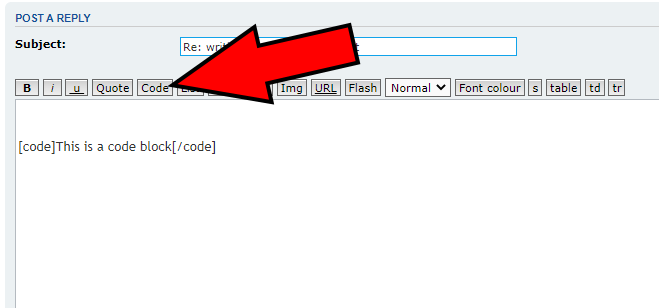
- Forums Code Block.png (14.22 KiB) Viewed 20207 times
For your latest problem - please attach the plugin XML so we can assist you further.