Inventory SOH Enable SerialNumber  Topic is solved

Discussions relating to Jiwa 7 plugin development, and the Jiwa 7 API.

Inventory SOH Enable SerialNumber

Postby 2can2 » Sat Feb 13, 2016 3:43 pm

Hi, In an earlier post you mentioned I could LOCK a field in a Grid via permissions which works Great!
However I am having trouble trying to Unlock the SerialNumber field in Inventory Maintenace, SOH for editing for 'Admin' role.
I have set read and write access (Column 72) to Allowed which highlights the correct fields in the Permissions form but then I close and relog but it doesn't Unlock the SerialNumber field. It locks the 'Comment' field fine if I set that field to Disallow?
Am I missing something?

I also tried it in a Plugin but it doesn't have any effect
Code: Select all
 Public Sub SetupBeforeHandlers(ByVal JiwaForm As JiwaApplication.IJiwaForm, ByVal Plugin As JiwaApplication.Plugin.Plugin) Implements JiwaApplication.IJiwaFormPlugin.SetupBeforeHandlers
            Dim INVUI As JiwaInventoryUI.InventoryMaintenanceForm = DirectCast(JiwaForm, JiwaInventoryUI.InventoryMaintenanceForm)

            INVUI.grdSOH.AddColumn("GRNSupplier", New JiwaApplication.JiwaManageGrid.JiwaTextCellType, "GRN Supplier", 20, False, True, False, True)
           INVUI.grdSOH.LockColumn(False, "SerialNumber", -1)
      End Sub


Thanks.
2can2
Frequent Contributor
 
Posts: 171
Joined: Tue Feb 26, 2008 10:24 am
Topics Solved: 25

Re: Inventory SOH Enable SerialNumber

Postby Mike.Sheen » Fri Feb 26, 2016 3:57 pm

The serial number column on that grid was never intended to allow the user to edit that field, so unlocking it is one thing, but the business logic simply does not attempt to write away the serial number. It will update the special price, expiry and comment fields - but not the serial number field.

Fortunately it's not too hard to work around that and do a dirty update in a plugin. Another complication is the fact that data is lazy-loaded, which means just unlocking that column when the form loads or finishes reading simply isn't good enough - because if the user is looking at the main tab when reading a record the soh grid isn't populated until the user clicks the soh tab - so you need to unlock the serial no. column at that point.

Attached is a plugin which does this. I assumed you wanted VB.NET as the code snippet was in VB.NET.

Mike
Attachments
Plugin Inventory Maintenance - Unlock Serial No. field.xml
Sample Plugin
(33.15 KiB) Downloaded 516 times
Mike Sheen
Chief Software Engineer
Jiwa Financials

If I do answer your question to your satisfaction, please mark it as the post solving the topic so others with the same issue can readily identify the solution
User avatar
Mike.Sheen
Overflow Error
Overflow Error
 
Posts: 2583
Joined: Tue Feb 12, 2008 11:12 am
Location: Perth, Republic of Western Australia
Topics Solved: 807

Re: Inventory SOH Enable SerialNumber

Postby 2can2 » Fri Feb 26, 2016 6:24 pm

Thanks so much Mike for all the effort! I didn't realise it would be such a big deal so greatly appreciated! It works a treat and client will be very happy.

The customer is Rocky Repro and they do Bull semen. The serial number is working brilliantly for them as we have coded it so at any point in time they can run a report to see ALL Straws (serial no item) for a Specific owner in up to 300 Tanks (Bin Locations). They have about 150,000 straws to control at any one time and the software is handling it beautifully!!

Thanks again. I am off for 3 weeks tonight hence the urgency.

Presumptious I know but one other enhancement would be to only Unlock the SerialNo IF the user = 'Sally'. I don't want to stuff anything up, so if you would let me know the line to add before the Unlock statement and update check that would be great! When time allows - I know I see your responses late at night, overload!

Cheers
2can2
Frequent Contributor
 
Posts: 171
Joined: Tue Feb 26, 2008 10:24 am
Topics Solved: 25

Re: Inventory SOH Enable SerialNumber  Topic is solved

Postby Mike.Sheen » Fri Feb 26, 2016 9:01 pm

2can2 wrote:Presumptious I know but one other enhancement would be to only Unlock the SerialNo IF the user = 'Sally'. I don't want to stuff anything up, so if you would let me know the line to add before the Unlock statement and update check that would be great!


You don't check for username, instead you:
  • Create an abstract permission
  • Create a user group
  • Add the desired users to the group
  • Modify the plugin to check for an Allowed permission for the current user for that permission

Attached is an updated plugin - you should import that (it'll just update the previous one posted if your database already has it).
Plugin Inventory Maintenance - Unlock Serial No. field.xml
Sample plugin - updated for permissions
(36.69 KiB) Downloaded 503 times


Once imported, on the documents tab of the plugin there is a SQL script - open and run that against your database - this will create an abstract permission.

Then quit Jiwa and log in again. Now create a new user group, and add the desired users to the group:
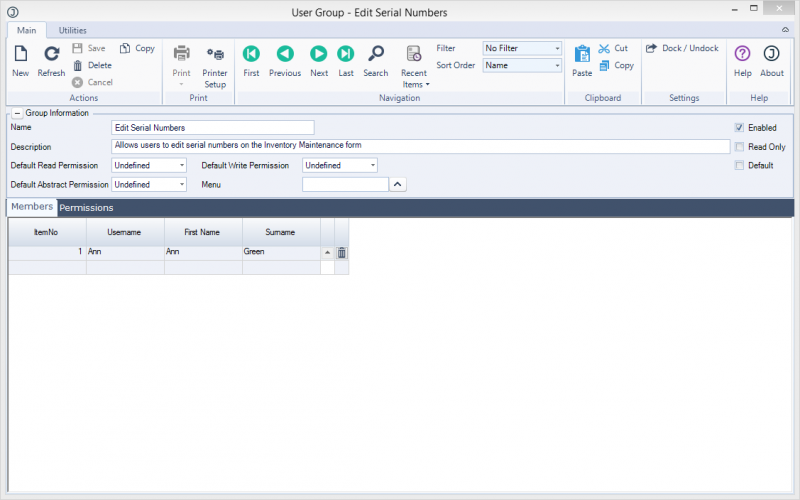
2-CreateUserGroup.PNG
Create user group


Then open the Inventory Maintenance form. On the utilities tab, select set permissions and locate the newly created group.
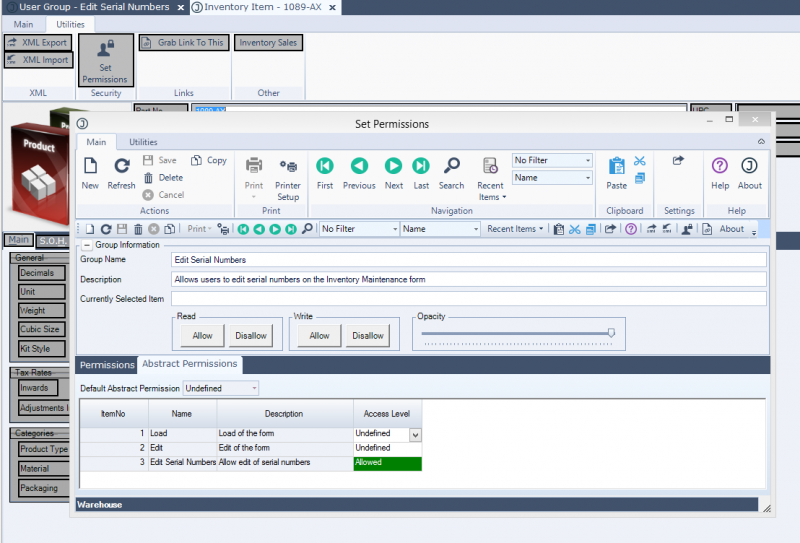
3-ApplyPermission.PNG
Apply permission

On the abstract permissions tab, set the new "Edit Serial Numbers" permission to allow. Save.

In the screenshots you can see I added a group called "Edit Serial Numbers" and added user "Ann" to that group, and then set the Allowed permission for the group "Edit Serial Numbers" to the abstract permission "Edit Serial Numbers". Now whenever Ann opens the inventory maintenance form, she can edit serial numbers.

Using the permissions system, the customer is able to control who can edit the serial numbers simply by adding or removing them from the user group - no need to edit the plugin.

The code to check for the permission is pretty simple:

Code: Select all
    Dim permission As JiwaApplication.Security.UserGroup.AccessLevels = JiwaApplication.Manager.Instance.Staff.GetAbstractPermission("JiwaFinancials.Jiwa.JiwaInventoryUI.InventoryMaintenanceForm", "Edit Serial Numbers")
      
    If permission = JiwaApplication.Security.UserGroup.AccessLevels.Allow Then
        inventoryForm.grdSOH.LockColumn(False, "SerialNumber", -1)
    End If


I have another post made earlier which talks about permissions. Permissions are much more flexible than checking for a username for deciding who can do what.

Mike Sheen
Chief Software Engineer
Jiwa Financials

If I do answer your question to your satisfaction, please mark it as the post solving the topic so others with the same issue can readily identify the solution
User avatar
Mike.Sheen
Overflow Error
Overflow Error
 
Posts: 2583
Joined: Tue Feb 12, 2008 11:12 am
Location: Perth, Republic of Western Australia
Topics Solved: 807


Return to Technical and or Programming

Who is online

Users browsing this forum: No registered users and 3 guests