2can2 wrote:Presumptious I know but one other enhancement would be to only Unlock the SerialNo IF the user = 'Sally'. I don't want to stuff anything up, so if you would let me know the line to add before the Unlock statement and update check that would be great!
You don't check for username, instead you:
- Create an abstract permission
- Create a user group
- Add the desired users to the group
- Modify the plugin to check for an Allowed permission for the current user for that permission
Attached is an updated plugin - you should import that (it'll just update the previous one posted if your database already has it).
Once imported, on the documents tab of the plugin there is a SQL script - open and run that against your database - this will create an abstract permission.
Then quit Jiwa and log in again. Now create a new user group, and add the desired users to the group:
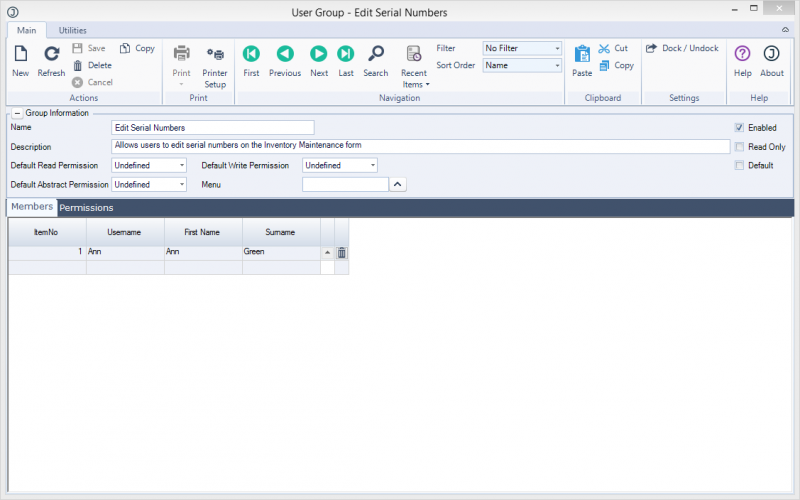
- Create user group
Then open the Inventory Maintenance form. On the utilities tab, select set permissions and locate the newly created group.
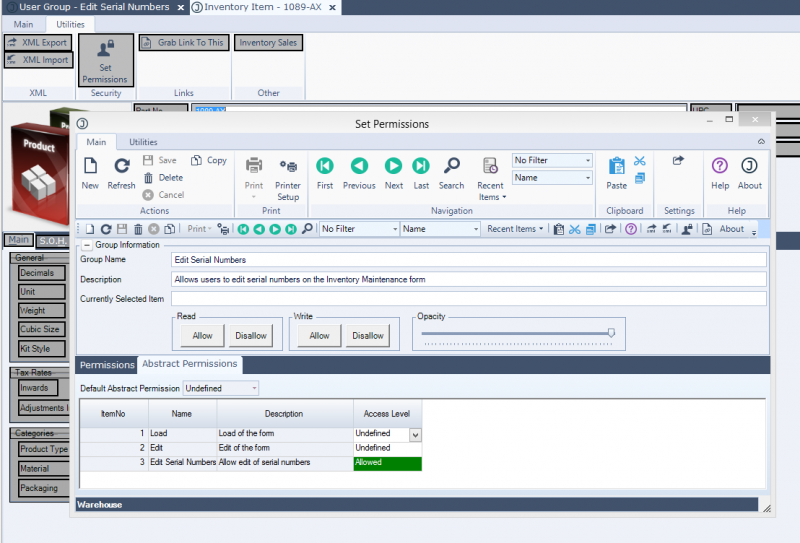
- Apply permission
On the abstract permissions tab, set the new "Edit Serial Numbers" permission to allow. Save.
In the screenshots you can see I added a group called "Edit Serial Numbers" and added user "Ann" to that group, and then set the Allowed permission for the group "Edit Serial Numbers" to the abstract permission "Edit Serial Numbers". Now whenever Ann opens the inventory maintenance form, she can edit serial numbers.
Using the permissions system, the customer is able to control who can edit the serial numbers simply by adding or removing them from the user group - no need to edit the plugin.
The code to check for the permission is pretty simple:
- Code: Select all
    Dim permission As JiwaApplication.Security.UserGroup.AccessLevels = JiwaApplication.Manager.Instance.Staff.GetAbstractPermission("JiwaFinancials.Jiwa.JiwaInventoryUI.InventoryMaintenanceForm", "Edit Serial Numbers")

    If permission = JiwaApplication.Security.UserGroup.AccessLevels.Allow Then
        inventoryForm.grdSOH.LockColumn(False, "SerialNumber", -1)
    End If
I have
another post made earlier which talks about permissions. Permissions are much more flexible than checking for a username for deciding who can do what.



